Posts

Different ways to initialize arrays in java

Different ways to initialize array's in java Array Initialization in Java Different ways to initialize array's in java Java Arrays can be populated in a number of ways following summarizes different options. One item at a time using a loop Following example we are declaring rolNumms array of size 10 and adding one item at a time using a for a loop. //Using For loops int rollNums[] = new int[10]; for (int i=0; i At the Time of Declaration We can set the content of the array while declaring the array it self. Both the syntax will result in initializing the array with 10 items. Note that when we provide the initializer while declaring the size of the array cannot be specified. int rollNums2[] = new int[] {1, 2, 3, 4, 5, 6, 7, 8, 9 ,10}; int rollNums3[] = {1, 2, 3, 4, 5, 6, 7, 8, 9 ,10}; Arrays.setAll() and Generator function We can set the content of the array using the Arrays.setAll() method as well. int rollNums4 [] = new int [10]; Arrays.setAll(rollNums4, p -> p ...

Determine OS version from Command line in MacOS

Image
Sometimes we would like to know about the installed MacOS from Terminal. Or say we are writing scripts to extract the OS related information like it's version and release name etc. For Mac we have couple of options System Profiler Execute the following command from Terminal system_profiler As you can see from the screenshot system_profiler will print a lot of information about the Software and Hardware of the Mac. This is it..... sw_vers Execute the following command from Terminal sw_vers As you can see from the screenshot sw_vers will print information about the current installed OS Name and Version.

How to change computer name and user name in terminal command prompt in MacOS

Sometimes we want to hide the system name or username that is displayed on the Terminal. May be to take some screenshot and then paste it in the blog and we want to hide the System name/user Name etc. For Bash based terminals it can be done by setting PS1 variable. Example on the terminal $ export PS1="> " > $ PS1="Mac:~sidd:" Mac:~sidd: $ export PS1="This is Demo Terminal: $ " This is Demo Terminal: $ Change your prompt in your  profile file to make it permanent across all Terminals and new sessions.

How to Install Apache 2 on Ubuntu Linux

Following are the steps to install Apache 2 on Ubuntu Linux and then start it. Update the System Repository sudo apt update Install Apache2 Software with apt command sudo apt install apache2

How to convert HttpResponse to String in Java

Following code snippet explains how to convert HttpResponse object to String in Java Steps Call httpclient.execute() Get the InputStream from the response Convert the InputStream to ByteArrayOutputStream Convert the ByteArrayOutputStream to String Close the request and InputStream private String executeAndGetResponse(HttpRequestBase request) throws IOException, ClientProtocolException, Exception, UnsupportedEncodingException { HttpResponse response = httpClient.execute(request); InputStream inputStream = response.getEntity().getContent(); ByteArrayOutputStream result = new ByteArrayOutputStream(); byte[] buffer = new byte[1024]; int length; while ((length = inputStream.read(buffer)) != -1) { result.write(buffer, 0, length); } String strRes = result.toString(StandardCharsets.UTF_8.name()); request.releaseConnection(); inputStream.close(); return strRes; }

Jackson Object Mapper to conver String to JsonNode

Following are some of the code snippet for Jackson Object Mapper Convert String to JsonNode Object String data; JsonNode jsonNode = getObjectMapper().readTree(data); Convert an Object to JSON String String jsonString = getObjectMapper().writeValueAsString(object); Convert InputStream to JsonNode Object InputStream inputStream; JsonNode jsonNode = getObjectMapper().readTree(inputStream);

How to check what version of JQuery is loaded in browser

Sometimes we might want to know what version of jQuery a particular site is using. It is not always possible to know the version of jQuery we are using through the jQuery File name or reading the content of the files, specially when the jQuery is minimized. Following snippet can tell us the version of jQuery loaded by a site. if (typeof jQuery != 'undefined') { // jQuery is loaded => print the version alert(jQuery.fn.jquery); } Simply go to the console of the browser, once the webpage is loaded, and then type. the above command on the console. It should display the version as an Alert.

How to generate sitemap for Blogs hosted on Blogger

Image
Blogger comes with some goodies, like the atom feed URL, which can be used to generate sitemap for bloggers. Sign in to   Google Search Console . Select the Blog from the left hand side. Click on Sitemaps link. At the top of the page with title "Add a new sitemap" Add the below code in the text field. atom.xml?redirect=false&start-index=1&max-results=500 Example :   https://webdevpedia.blogspot.com/atom.xml?redirect=false&start-index=1&max-results=500 Press “Submit Sitemap” button.

Handle 409 conflict document in couchdb

Problem Use case:  CouchDB Error 409 conflict document. Exception Details [Truncated]: CouchDB is throwing error 409 conflict while calling REST API to update data. CouchDB will throw 409 conflict document exception if the payload is not proper. Following are some of the cases. "_id" : This attribute is present, but the "_rev" attribute is not present or is wrong. CouchDB uses both the "_id" and "_rev" attribute while updating a Document. Every time we update a document the "_rev" attribute value gets updated. Solution: If we want to update data, then make sure both "_id" and "_rev" attributes are carrying proper values respectively. Referance Links related to CouchDB: https://webdevpedia.blogspot.com/2019/07/installing-couchdb-on-gcp-compute-engine.html

CouchDB Error 412:Precondition Failed

Problem Use case:  CouchDB Error 412:Precondition Failed Exception Details [Truncated]: CouchDB is throwing error while calling REST API to update data. Solution: CouchDB will throw 412:Precondition Failed exception if the payload does not contain the unique identifier "_id" attribute or its value is missing. Check the payload for PUT or POST to make sure the "_id" attribute is not missing. Referance Links related to CouchDB: https://webdevpedia.blogspot.com/2019/07/installing-couchdb-on-gcp-compute-engine.html

Starting Spring Boot Application in Debug mode

Start the Spring boot application with the following jvm argument. mvn spring-boot:run -Drun.jvmArguments="-Xdebug -Xrunjdwp:transport=dt_socket,server=y,suspend=y,address=5005"

Maven attach source code for external Jar

For Java project that uses Maven for dependency and building we can attach the third party library source. By default the source is not available, using the following commands we can down load the associated source and java doc from maven repository by reading the project pom file. Maven will not be able to download sources and docs if those were not published for a particular library. mvn dependency:sources mvn dependency:resolve -Dclassifier=javadoc //to download source for only one library mvn dependency:sources -DincludeArtifactIds=spring-boot Now after executing the above two commands, maven will download the respective sources and java docs. Now we can attach the source in the IDE. For eclipse specially it is better to use the Maven Eclipse plugin mvn eclipse:eclipse -DdownloadSources=true mvn eclipse:eclipse -DdownloadSources=true -DdownloadJavadocs=false Executing the above commands will also download the sources and it also updates the .classpath file. Now refr...

Failed to instantiate [java.util.List]: Specified class is an interface in HTTP controller handler?

Problem Use case: Following SpringBoot Rest Controller is not able to map the request payload @Controller @RequestMapping("/api") public class BlogController { @RequestMapping(value = "/blogstories", method = RequestMethod.POST, produces = MediaType.APPLICATION_JSON_VALUE) public ResponseEntity<List<BlogStoryObject>> addUpdateblog(List<BlogStoryObject> blogItems) { List<BlogStoryObject> result = new ArrayList<BlogStoryObject>(); //TODO:: Call Service to update/save objects return new ResponseEntity<List<RootBlogStoryObject>>(result, HttpStatus.OK); } } Exception Details [Truncated]: And the error thrown at runtime is Failed to instantiate [java.util.List]: Specified class is an interface. Solution Solution to the problem is to @RequestBody annotation to the method definition, so the following will work. public ResponseEntity<List<RootBlogStoryObject>> addUpdateblog...

Spring Boot Error : Unable to start EmbeddedWebApplicationContext due to missing EmbeddedServletContainerFactory

Problem Use case: While starting a Spring Boot Application using mvn spring-boot:run The Application fails to start Unable to start EmbeddedWebApplicationContext due to missing EmbeddedServletContainerFactory bean. Exception Details [Truncated]: [ERROR] Failed to execute goal org.springframework.boot:spring-boot-maven-plugin:1.5.9.RELEASE:run (default-cli) on project Javaexp-springboot-rest: An exception occurred while running. null: InvocationTargetException: Unable to start embedded container; nested exception is org.springframework.context.ApplicationContextException: Unable to start EmbeddedWebApplicationContext due to missing EmbeddedServletContainerFactory bean. -> [Help 1] [ERROR] [ERROR] To see the full stack trace of the errors, re-run Maven with the -e switch. [ERROR] Re-run Maven using the -X switch to enable full debug logging. [ERROR] [ERROR] For more information about the errors and possible solutions, please read the following articles: [ERROR] [Help 1...

Spring Boot CommandLineRunner

CommandLineRunner is an interface which allows us to write code that would be executed when the SpringBoot Application is initialized and before the startup is finished. Technology used Java 8 Spring boot 1.5.9 Logback 1.1.1.1 Maven 3.5.0 Implementation This project uses Maven to build the project.  It shows a very simple example of a Spring boot Application and two Classes implementing CommandLineRunner. High level steps as described bellow with sample code Define the pom.xml file Write Spring boot app class Write Spring boot CommandLineRunner class Change the order with Order annotation For simplicity the pom file is not provided here, but it can be found on the git repo here  https://github.com/siddharthagit/spring-boot-references/blob/master/spingboot-resttemplate/pom.xml SpringBoot Application Class ResttemplateApplication.java @SpringBootApplication public class ResttemplateApplication { private static final Logger log = Log...

Spring boot with Thymeleaf example

Image
This blog shows how to use Thymeleaf as a template engine with Spring boot. Technologies Used Java 8 Spring framework  1.5.9 Spring boot 1.5.9 Thymeleaf 2.1.6 Tomcat embed 8.5.23 Logback 1.1.1.1 Junit 4.12 Bootstrap 4 Maven 3.5.0 Implementation This project uses Maven to build the project.  It shows a very simple example of a login page with corresponding Spring boot controller. The goal of this project is to have a login page rendered using Thymeleaf template. The template it self uses the bootstrap css for styling. High level steps as described bellow with sample code Define the pom.xml file Write Spring boot app class Write Spring boot controller class Write  Thymeleaf Template for the controller class Write the CSS referred by Template file pom.xml <?xml version="1.0" encoding="UTF-8"?> <project xmlns="http://maven.apache.org/POM/4.0.0" xmlns:xsi="http://www.w3.org/2001/XMLSchema-instance...

Installing Couchdb on GCP Compute Engine

Image
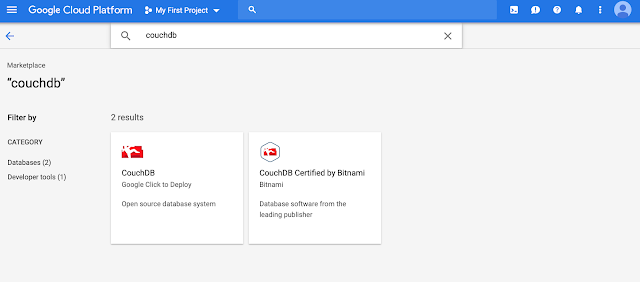
This article covers the steps that needed to install Apache Couchdb on Google Cloud Platform. There are various way of how to achieve this, that is having a Compute Engine (VM) installed with Couchdb. One option is to use the the Marketplace in GCP which offers quick option to deploy on Cloud Platform. Login to GCP and click on the  Marketplace Icon and then search for CouchDB. Although we would still need to perform some additional steps like Creating Firewall Rule etc so that we can access the instance after getting VM with CouchDB installed from Marketplace. Rather than using the Marketplace, we would do everything manually on the VM Instance. Following are the steps in details that i had to take to lunch an instance of CouchDB, do configuration update and create Firewall Rules to allow access to the instance. High level steps as covered bellow are Create an Instance of Google Cloud Engine Instance Install Apache CouchDB in the VM Configure the Database Instan...

Testing private method in Java

Private method in java is not accessible outside the Class which defines it. Since they cannot be accessed we cannot call them from any Test Class directly to test them. Following are some of the options to test the private method 1) Change the visibility of the private method to package or protected. 2) Create a public method in the Class and call the private method from the public method Above two solutions requires us to change the original Class. Some times we cannot change the original Class but still would like to have a Test Class for the same method. The other option is to use Reflection api to invoke the private method. For example lets try to test a private method multiple on Class CreditcardMask.java Class targetClass = (Class ) Class.forName(CreditcardMask.class.getName()); // get the method multiply Method testMethod = targetClass.getDeclaredMethod("multiply", Integer.class, Integer.class); Assert.assertNotNull("testMethod is Null", tes...

Proxy Design Pattern In java

Image
Type : Structural Design Pattern Summary Proxy Design pattern lets a Proxy Object rather then the real object to interact with Client. By doing so the proxy can control access to the real object or delay the creation of real object unless it is is really needed. Description In Proxy Design pattern the Client is served with a Proxy Object rather than the real object. Benefit of doing so is that, we have greater control in when to create the real object. It would help us in providing in lazy loading the real object, providing extra security checking etc.  Example For example lets consider a service called UserDetails Service which the Client calls to get UserDetails Object. Now say  UserDetails is a complex object, and we need to real the database to populate it. Also we would like to have a security authorization check by which we will not show the details at all or show only few attributes from UserDetails Object. Returning a Proxy rather than orig...

Flyweight Pattern in Java

Image
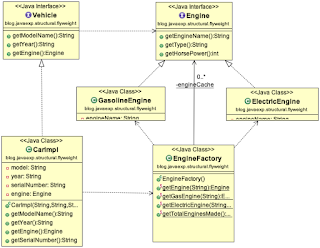
Type : Structural Design Pattern Summary Flyweight design pattern deals with sharing some of the internal details between different object instances, so that we can save memory by basically using less duplication of the attributes across its instances. Details In Flyweight design pattern the Object attributes are categorized into its extrinsic and intrinsic attributes.  Extrinsic  attributes  are the attributes that can be considered as sharable across other instances.  Intrinsic  attributes  are the attributes that are unique for each object, like the primary key, unique fields etc. In Flyweight design we can improve the memory footprint by reusing the extrinsic properties in multiple instances of the object. Flyweight can use Cache to store the different Extrinsic states. Factory method can be used to create the instances of the Extrinsic object and stored in cache. Example For instance say we are designing a Vehicle in OOP. ...